
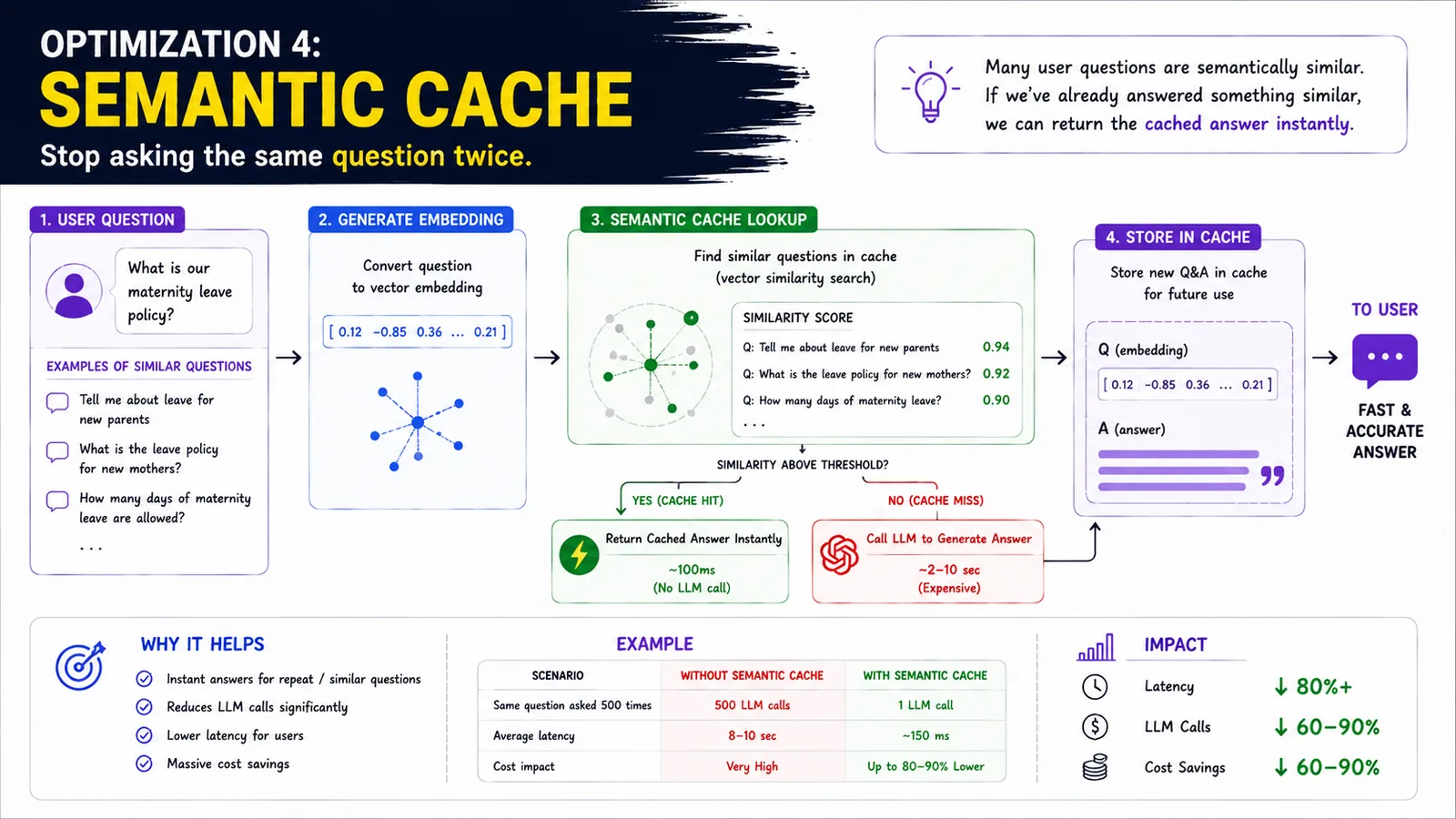
A semantic cache stops you asking the same question twice. Many user questions are semantically similar; if you've already answered a similar one, you can return the cached answer instantly.
In simple terms
Cache answers by meaning, so similar questions return instantly without calling the LLM.
How it works
- 1A user question is converted to an embedding.
- 2Semantic cache lookup: search the cache by vector similarity.
- 3If a similar question scores above the threshold (cache hit), return the cached answer instantly.
- 4If not (cache miss), call the LLM to generate the answer.
- 5Store the new Q&A in the cache for future use.
Key points
- Matches by meaning, not exact text — 'maternity leave policy' ≈ 'leave policy for new parents'.
- Cache hit ≈ 100ms vs an LLM call of seconds.
- Typical impact: 80%+ lower latency, 60–90% fewer LLM calls and cost savings.
- Great for repeated or similar questions at scale.
Why it matters
In production, many questions repeat. A semantic cache serves those instantly and cheaply, slashing latency and LLM cost for high-traffic systems.
Frequently asked questions
- How is it different from a normal cache?
- It matches by semantic similarity, so paraphrased questions still hit the cache.
- When does it help most?
- When many users ask similar questions — support bots and FAQs benefit hugely.
More in RAG & Retrieval (Enterprise)
Where Hallucinations Come From
Failures across the query, retrieval and model layers.
RAG Retrieval Optimization Layer
Retrieve the right context with high recall and relevance.
RAG: Retrieval Re-ranking
Re-rank retrieved docs to keep only the most relevant.
RAG Optimization 1 · Hybrid Search
Keyword + semantic search for higher recall.
RAG Optimization 2 · Re-ranking
Find the most relevant docs before the LLM.
RAG Optimization 3 · Context Pruning
Remove noise; keep only what matters.