
WebMCP (Web Model Context Protocol)
MCP for the web — AI in the browser using online tools.
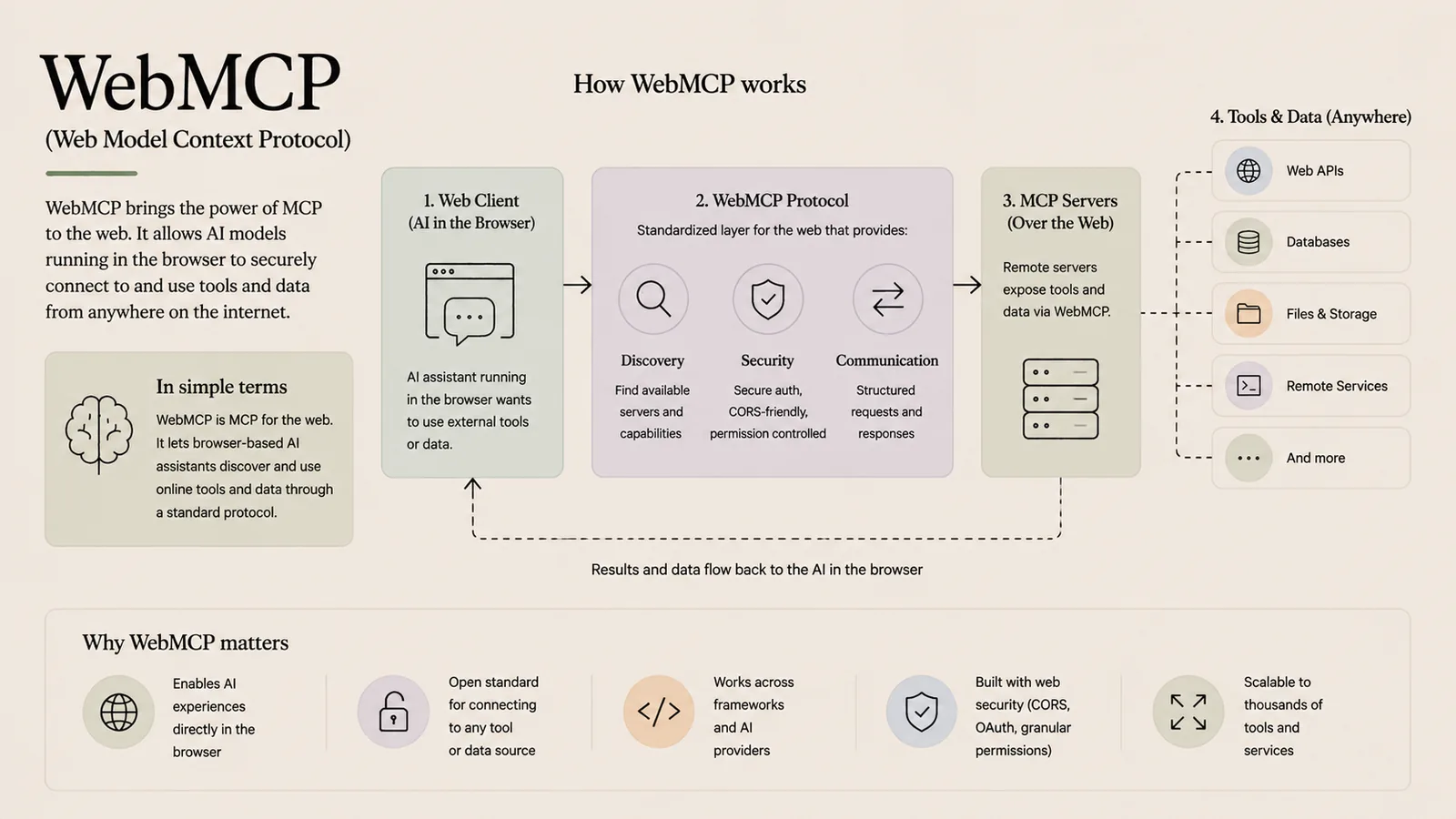
WebMCP brings the power of MCP to the web. It lets AI models running in the browser securely connect to and use tools and data from anywhere on the internet — MCP for browser-based AI.
In simple terms
MCP for the web: browser-based AI assistants discover and use online tools through a standard protocol.
How it works
- 1Web client (AI in the browser): an AI assistant running in the browser wants to use external tools or data.
- 2WebMCP protocol: a standardized web layer provides discovery, security (CORS-friendly, permission-controlled) and communication.
- 3MCP servers (over the web): remote servers expose tools and data via WebMCP.
- 4Results and data flow back to the AI in the browser.
Key points
- Enables AI experiences directly in the browser.
- Open standard for connecting to any tool or data source.
- Works across frameworks and AI providers.
- Built with web security in mind — CORS, OAuth and granular permissions.
Why it matters
WebMCP extends MCP's 'connect once, use anywhere' idea to browser-based AI. It lets web apps give in-browser assistants secure access to online tools and data, scalable to thousands of services.
Frequently asked questions
- How is WebMCP different from MCP?
- It's MCP adapted for the browser and the web, with web-native security like CORS and OAuth.
- Why does it matter for the web?
- It lets AI running in the browser safely use remote tools and data through a single open standard.
More in Agents, Tools & Protocols
AI Agent
An autonomous system that perceives, reasons and acts.
LangChain
A framework for building LLM-powered applications.
MCP (Model Context Protocol)
The universal adapter connecting AI to tools and data.
Fine Tuning
Adapt a pre-trained model to your specific data and task.
Fine-Tuning (Deep Dive)
The full fine-tuning workflow and hyperparameters.
Loop Engineering
Feedback loops that make AI outputs improve over time.